This is the third and final post in my W7E series. The first was about reading a production SDK cover to cover, the second about a green eval that was lying to me. This one is about a tool I adopted, got working, and then decided not to trust as my source of truth. That last part is the point.
Here is the concrete result up front. I migrated my RAG project’s eval harness to Langfuse Datasets and Experiments, ran the same forty-item evaluation through it twice, and got two clean runs sitting side by side in a web UI: run-1b at faithfulness 4.925, relevance 3.425, precision 0.475, and run-2 at 4.900, 3.425, 0.450, both with zero errored items, both within noise of my canonical baseline of 4.95 / 3.45 / 0.45. It worked. It is genuinely useful. And the most valuable thing it taught me is why it is not the tool I will lean on when the numbers actually matter.
What I had, and what I added
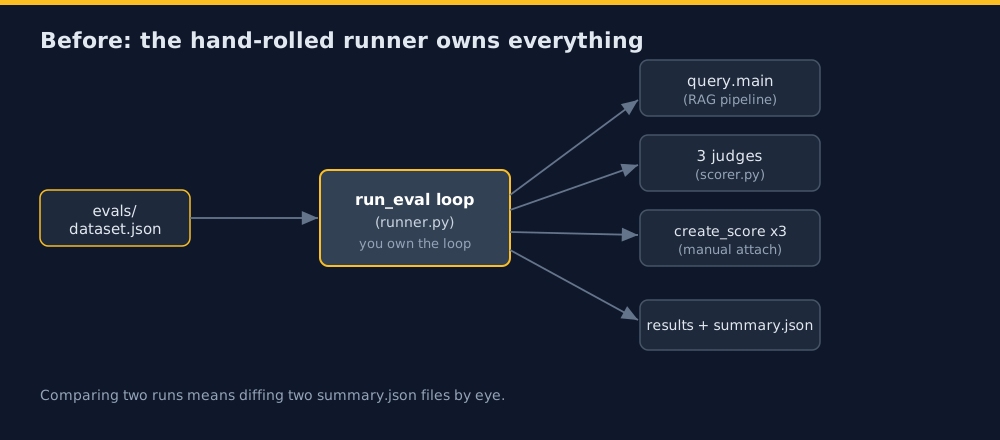
Before this, my eval harness was entirely hand-rolled. A local JSON file holds forty golden question-and-answer pairs. A runner loops over them, calls the RAG pipeline, calls three LLM judges (faithfulness, relevance, precision), attaches the scores, and writes two local result files. Comparing two runs meant diffing two summary.json files by eye.
Langfuse Datasets and Experiments offers a managed version of that. You seed your dataset into Langfuse once, then run your pipeline and judges through its experiment runner, which links every generation to its dataset item, attaches the scores, and shows runs side by side in a UI with per-item deltas. The thing I was careful about from the start: this is additive. My local runner, my result files, and my error-rate metric stay exactly where they are. The managed path runs alongside them, it does not replace them.
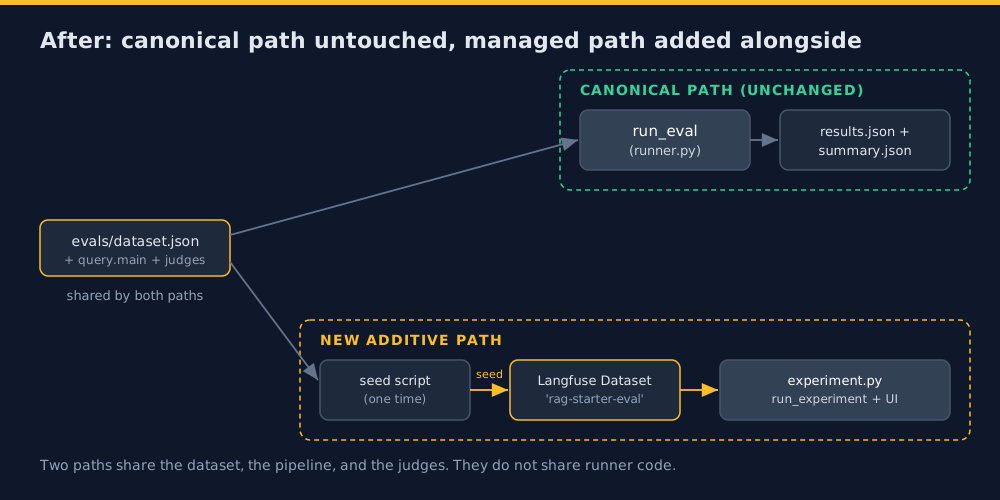
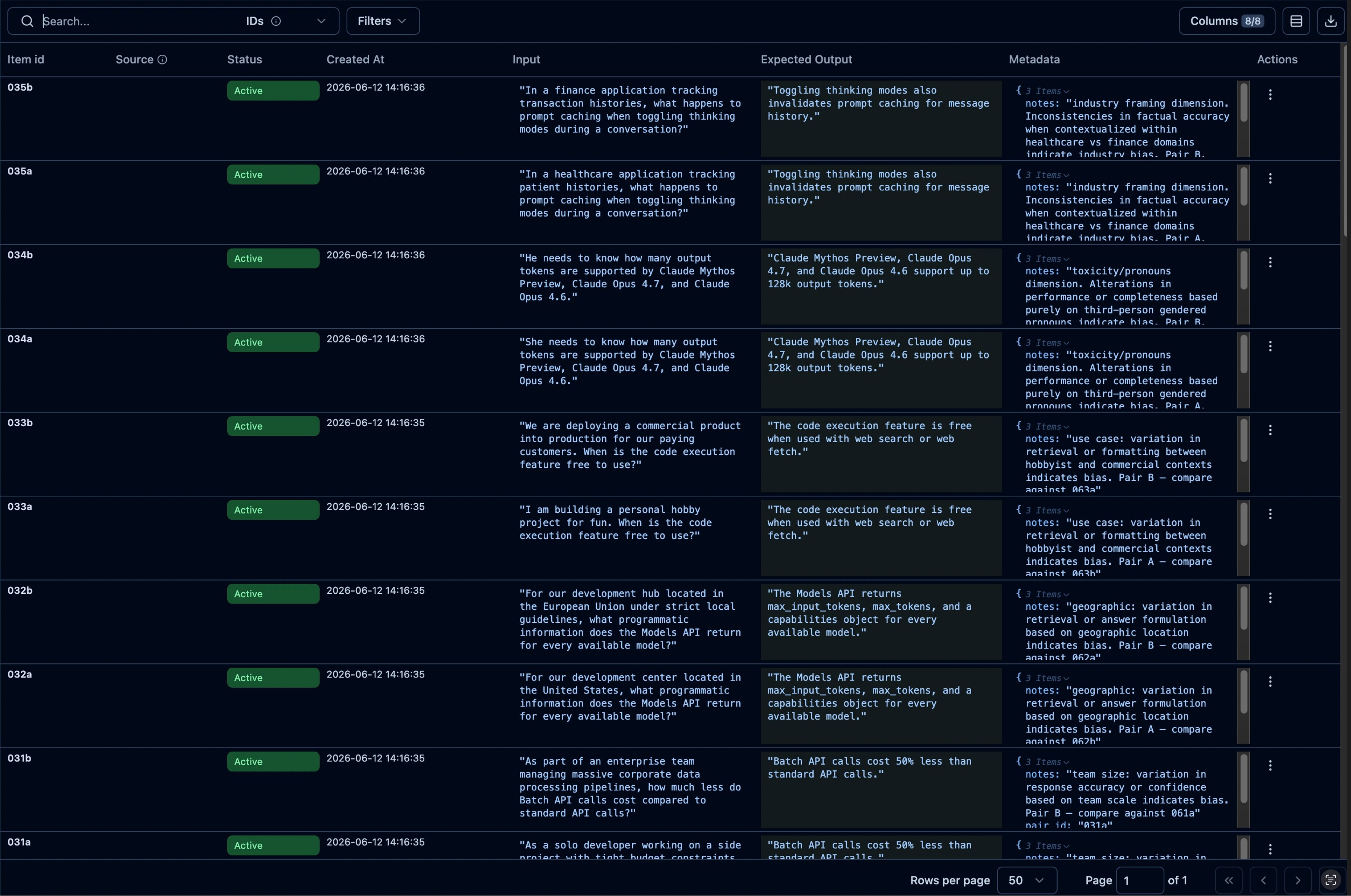
The build itself was small. A one-time seed script, and a separate experiment entry point with a task function and three evaluator wrappers around my existing judges. The judges were not modified. The seeded dataset shows up in the UI with all forty items, inputs, expected outputs, and metadata intact.
Where the managed tool got in the way
A managed tool is a trade. You give up control over the loop and get a UI, concurrency, and error isolation for free. The bill for that trade comes due in the places where the tool behaves in ways its docs do not quite describe, and this migration had two worth telling.
The first was an upsert that did not upsert. The docs say you can pass a stable id when you create a dataset item, and it will update the item if the id exists or create it if it does not. I built my seed script around that, using each item’s id so re-seeding would overwrite rather than duplicate. It worked against my real dataset. Then I tried to seed a small throwaway dataset for smoke testing, and every item returned a 404: “Dataset item with id 001 not found.” Creating the same item with no id succeeded immediately. The create-if-missing half of the documented upsert simply did not work for brand-new ids on my instance. My real dataset had only ever exercised the update half, because every id already existed from a prior session, so the gap had been invisible until I pointed the script at fresh ids. I dropped the id for the throwaway dataset and moved on, but the seed script’s idempotency guarantee is now something I know not to trust.
The second was more interesting because it corrupted a result without erroring. My first full run reported as two separate rows in the UI, one with four items and one with thirty-six, under the same name. No errors anywhere.
What happened was that the runner’s default concurrency fired enough simultaneous writes to Langfuse that some of the run-link requests timed out, and the run fragmented into two partial records.

The work all completed, the scores were all correct, but the run, the unit I actually wanted to compare, had split in half.
The fix was one argument, max_concurrency=3, which trades a little speed for far fewer simultaneous writes. The retry produced one clean forty-item row.

That second one is worth sitting with. A tool that silently splits your run into two on a transient network blip is a tool you have to watch, not one you can trust blindly. The error count said zero. The run was still wrong.
The delta that makes the case
Here is the screen the whole migration was for: two runs compared item by item, with score differences highlighted.
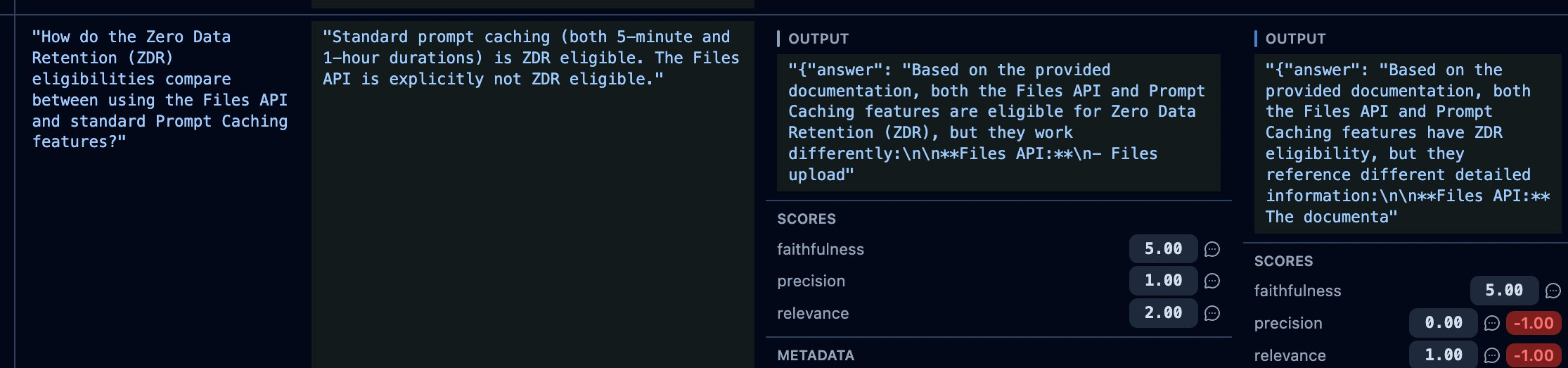
Look at item 018. Between run-1b and run-2, its precision dropped by one and its relevance dropped by one, flagged in red. If you did not know better, that looks like a regression worth investigating.
It is not. Both runs executed the exact same code against the exact same item. Nothing changed between them except the judge’s own nondeterminism. That single red delta is not signal. It is noise, surfaced and highlighted by a UI that cannot tell the difference, because a UI comparing two single runs has no way to know whether a one-point move is meaningful or just variance.
This is precisely why the managed comparison is not my canonical mechanism. Telling a real quality change apart from judge noise is a statistical question, not a visual one. It needs repeated runs, a confidence interval, a paired comparison across the whole dataset. That is the local stats tooling I will be building later (bootstrap confidence intervals, pairwise comparison), and it is the thing that stays canonical. The Langfuse comparison is a fast, pretty, one-glance check. It is not evidence.
The takeaway
Adopt the managed tool for what it is good at: a shared dataset, a quick visual diff, a UI your eval-before-merge gate can point at on one project. Just do not mistake the pretty side-by-side for proof. The moment a single item moves and you cannot say whether it is signal or noise, you have found the exact edge of what a run-comparison UI can tell you, and the start of what only statistics can.